


Introducing Multi Account: connect your e-commerce store, your IMS, multiple accounts, or merge existing StockTrim accounts - all in one place.
StockTrim has always connected with the platforms you use to manage inventory and sales. Until now, that meant picking one. Today, that changes.
We’re launching Multi Account - a new feature that lets you connect StockTrim to as many platforms as you need, all at once. Your stock levels and sales history are pulled from every connected account, summed up, and turned into one clear inventory plan and forecast for your whole business.
What does Multi Account let you do?
Multi Account is flexible enough to work however your business is set up.
1. Connect your e-commerce store and your IMS together
Running a Shopify store alongside an inventory management system (IMS)? You can now connect both to StockTrim. Sales data from your storefront and stock levels from your IMS are pulled together and aggregated - giving you one accurate picture for demand forecasting and inventory planning.
2. Aggregate multiple accounts from the same platform
Operating several Shopify stores, multiple Xero accounts, or more than one location in your IMS? Connect them all. StockTrim combines the data from each and builds your plan against the real total.
3. Merge existing StockTrim accounts
If your business has grown into multiple StockTrim accounts over time, you can now bring them together. One login, one forecast, one inventory plan.
The Aggregate View and the Account View
Once your accounts are connected, StockTrim gives you two ways to look at your data.
- The aggregate view combines stock levels and sales history from every connected account into one unified inventory plan with forecasts for every product in its whole. This is your whole-of-business view - what you actually need when you’re deciding what to order and when.
- The individual account view lets you zoom in on any single connected platform. See how that specific store or system is performing, what’s low on stock, and what the forecast looks like - without losing sight of the bigger picture.
 StockTrim's intuitive interface allows you to view your sales data at one glance
How to set it up?
Multi Account is available to all StockTrim users now. Setup takes around 30 seconds:
- Go to the Load Data screen
- Click Connect Account
- Choose your platform and follow the prompts
No technical configuration or support ticket required.
Who gets the most out of this feature?
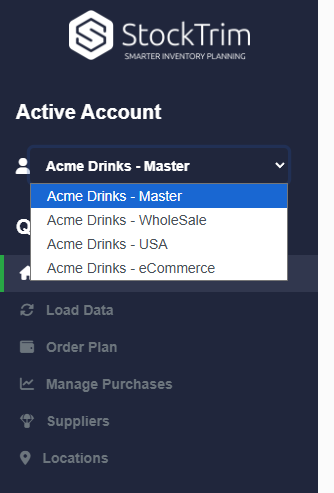
Consolidate your separate accounts easily with Multi Account
Multi-account is particularly useful if you:
-
Sell across more than one channel (e.g., wholesalers, manufacturers, retailers)
-
Use both an e-commerce platform and a separate IMS
-
Operate multiple store locations or regional entities
-
Have grown into separate StockTrim accounts and want to consolidate
New to StockTrim? Start a free trial at: https://go.stocktrim.com/account/register.
About StockTrim
StockTrim is an inventory planning and forecasting platform for product-based businesses. It connects with the platforms you already use to generate smart reorder recommendations and demand forecasts — helping businesses cut stockouts, reduce excess inventory, and free up cash flow.