


Managing overseas suppliers, shipping costs and minimum order quantities can make inventory planning complicated.
Order too little and you risk paying to ship a container that isn't full. Order too much and you can end up tying up cash in excess inventory, paying for additional storage or splitting shipments unnecessarily.
For businesses importing products, getting purchase quantities right isn't just about forecasting demand. It's also about making sure orders fit supplier packaging requirements and available shipping capacity.
StockTrim helps bring these decisions together. Rather than exporting purchasing recommendations into spreadsheets to calculate carton quantities, cubic metres and container capacity, you can manage these requirements directly within your forecasting and purchasing workflows.

Here are three ways StockTrim helps businesses plan more efficient purchase orders and shipments.
1. Track container volume and weight directly on purchase orders
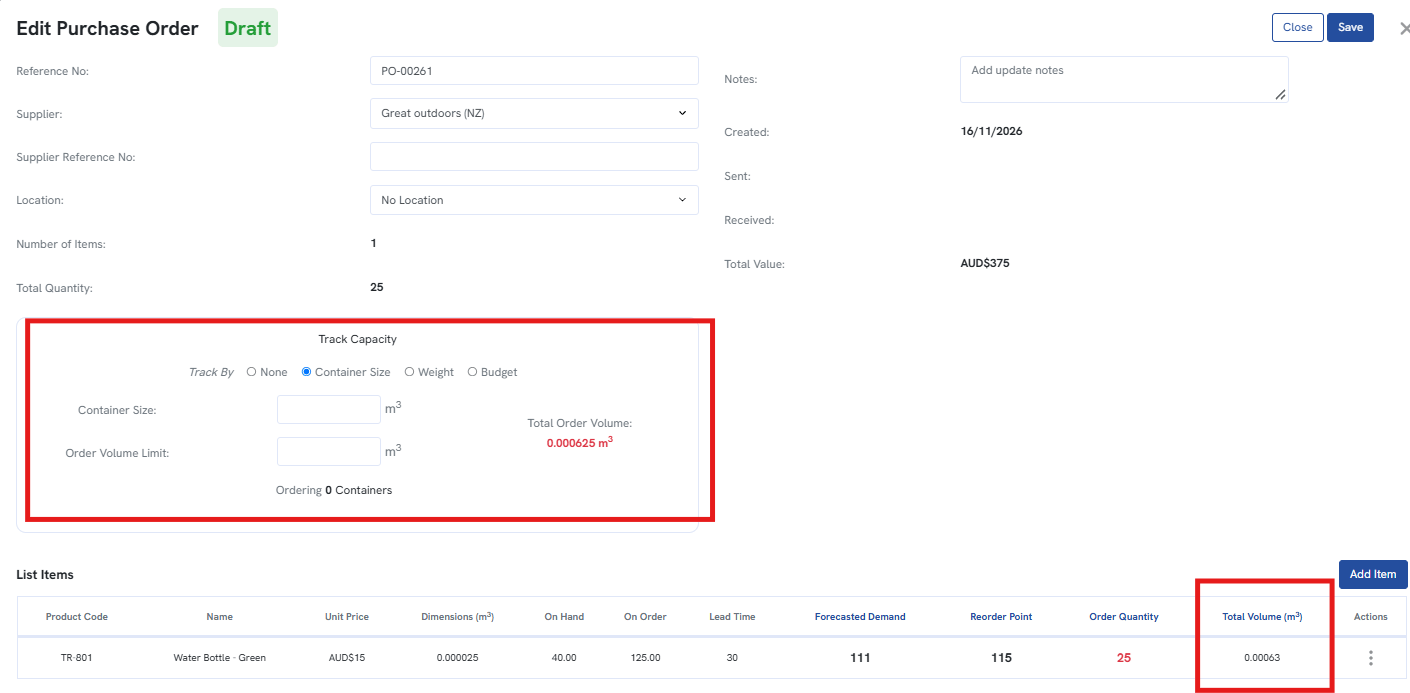
When creating a Purchase Order in StockTrim, you can see the estimated total volume and weight of your order, provided product dimensions and weights have been entered.
This makes it much easier to understand how much of your shipping container you're using before finalizing an order.
Setting up product dimensions
On the SKU Analysis page, you can enter the physical dimensions of each product, including length, width, height or total cubic volume, along with its weight.
Once this information is available, StockTrim can use it to calculate the overall volume and weight of your purchasing requirements.
Set capacity limits for each shipment
When creating or editing a draft Purchase Order in the StockTrim Purchase Orders Module, you can set capacity limits for the shipment.
For example, if you're booking a standard 40-foot shipping container, you might set a target volume of approximately 63-65 cubic metres, depending on the container and loading requirements.
You can also set limits based on maximum shipment weight or purchasing budget.
See how full your container is
As you review or adjust the suggested order quantities, StockTrim updates the shipment capacity information.
If your order exceeds the specified container limit, the capacity indicator turns red, giving you an immediate warning.
Make better use of available space
What if your order only fills 85% of the container?
You can review the remaining capacity and consider increasing quantities of products that sell regularly and are suitable for holding additional stock.
This gives purchasing teams a practical way to make better use of freight costs without simply ordering more of everything.
2. Account for master cartons and supplier packaging with BOMs
Most overseas suppliers don't ship individual retail products loose in a container. They use master cartons, inner packs and cases.
This creates an important consideration when calculating freight volume.
For example, 24 individual products might have a combined volume of 0.12 cubic metres. However, once they're packed into a master carton, the actual shipping volume could be larger because of the additional packaging.
If you're calculating freight using individual product dimensions alone, your estimates might not reflect the space actually required.
StockTrim can handle this using Bills of Materials (BOMs).
Create a master carton SKU
You can set up a carton or case pack as an assembled BOM product containing the correct number of individual retail units.
For example, a master carton might contain 24 individual products.
Enter the outer carton dimensions
Rather than using the dimensions of the individual products, you enter the actual dimensions and weight of the assembled master carton.
This gives StockTrim the information it needs to calculate the shipping volume based on the packaging your supplier will actually use.
Get more accurate container calculations
When purchasing using the carton SKU, StockTrim uses the outer carton dimensions to calculate the estimated shipment volume.
This helps avoid underestimating freight requirements and gives purchasing teams a more realistic picture of how much space their orders will occupy.
3. Automatically round orders to supplier batch sizes and MOQs
Another common purchasing headache is dealing with supplier minimum order quantities and packaging increments.
Suppliers might require you to order:
- Products in multiples of 12 or 24.
- Full cartons rather than individual units.
- Minimum quantities per product.
- Products in specific production batch sizes.

Manually adjusting every purchase order to meet these requirements can be time-consuming, particularly when managing hundreds or thousands of SKUs.
StockTrim includes a Batch / Container Size setting at the individual SKU level.
You can enter the required ordering multiple for each product, and StockTrim automatically rounds suggested purchasing quantities up to the nearest valid multiple.
For example, if your forecast suggests you need 50 units but your supplier only sells in cartons of 24, StockTrim rounds the recommended quantity up to 72 units.
This means your suggested purchasing quantities already account for supplier packaging requirements, reducing the need for manual adjustments before sending an order.
Bringing inventory forecasting and freight planning together
For businesses importing products, purchasing decisions involve more than simply forecasting how many units customers will buy.
You also need to consider supplier minimums, packaging sizes, shipping capacity, freight costs and how much additional stock makes commercial sense.
StockTrim brings several of these considerations together in one purchasing workflow.
By combining demand forecasting, batch-size rounding, BOM carton dimensions and live Purchase Order capacity tracking, businesses can:
- Make better use of available container space.
- Avoid ordering quantities that don't meet supplier packaging requirements.
- Get a clearer picture of shipment volume and weight before placing orders.
- Reduce manual calculations and spreadsheet work.
- Make more informed decisions about topping up shipments.
- Balance freight efficiency against the cost of holding additional inventory.
The goal isn't simply to fill every container. It's to make sure you're ordering the right products, in the right quantities, at the right time, while making the most of your freight spend.
Want to see how StockTrim can help improve your purchasing and inventory planning?
Book a free demo of StockTrim and see how demand forecasting, purchasing recommendations and container capacity tracking work together.