
CATEGORIES


Release Notes for August 2026
StockTrim Inventory Journal
Never Forget the History Behind Your Inventory Decisions
Until now, StockTrim has focused on the present and the future: your current inventory position, forecasts and recommended actions.
Inventory Journal adds the past, giving you a searchable history of the changes and decisions behind your inventory planning.
Over time, forecasts get adjusted, suppliers get updated, purchase orders get created and edited, and manual overrides get made. Inventory Journal keeps a record of these changes, along with who made them, when they were made, and any notes explaining the reasoning behind them.
This gives your business a clear audit trail of important inventory decisions, so you can understand why decisions were made, improve accountability across your team, and use that history to make better inventory decisions in the future.
A Complete Audit Trail for Your Inventory Planning
Inventory Journal automatically creates a searchable history of the important decisions made throughout StockTrim.
Every significant action can now be recorded alongside your own notes, creating a permanent record of what changed, who made the change, and when it happened.
Whether you're reviewing last month's purchasing decisions or trying to understand why a forecast was adjusted six months ago, Inventory Journal gives you the context you've been missing.
Record the Reason Behind Every Decision
Throughout StockTrim you'll now see an optional Notes field when making key inventory changes.
Use it to capture information such as:
-
"Supplier advised of a four-week production delay."
-
"Increasing forecast after customer confirmed new contract."
-
"Temporary promotion expected next month."
-
"Reducing order due to excess warehouse stock."
-
"Switching to new supplier because of pricing."
These notes become part of your inventory history, making future reviews far more meaningful than simply seeing that a value changed.
Automatic Change Tracking
Alongside your own notes, StockTrim automatically records the important changes that were made.
Inventory Journal tracks actions such as:
-
Demand Analysis updates
-
Manual forecast overrides
-
Purchase Order creation, edits, approvals, sending and deletes
-
Supplier updates
-
Settings updates
Each entry records the details of the changes behind the scenes, creating a complete audit trail without adding extra work.
Quickly Find Past Decisions
The new Inventory Journal page lets you search and filter your history in seconds. It's available in the left-hand main navigation for all users.
Search by:
-
SKU
-
Product name
-
Purchase Order number
-
Notes
-
Recorded system changes
Filter by:
-
Date range
-
User
-
Supplier
-
Activity type
Need to know why a purchase order was changed three months ago? Or who updated a supplier's lead time? Search the journal and the answer is there.
Better Collaboration Across Your Team
Inventory Journal is especially valuable for businesses where several people are involved in purchasing and inventory planning.
Instead of relying on emails, memory or verbal conversations, important decisions are now captured directly inside StockTrim where they belong.
New staff can quickly understand historical decisions, managers can review purchasing activity, and everyone works from the same source of truth.
Built for the Future
Inventory Journal gives you a much clearer picture of what has happened in StockTrim over time, not just where things stand today. You can look back at changes to forecasts, purchase orders and suppliers, see who made them, and record the reasoning behind important decisions.
This is the first version of the journal, and we'll keep adding more activity types based on how customers use it and the feedback we receive.
See It in Action
Your Inventory History in One Place
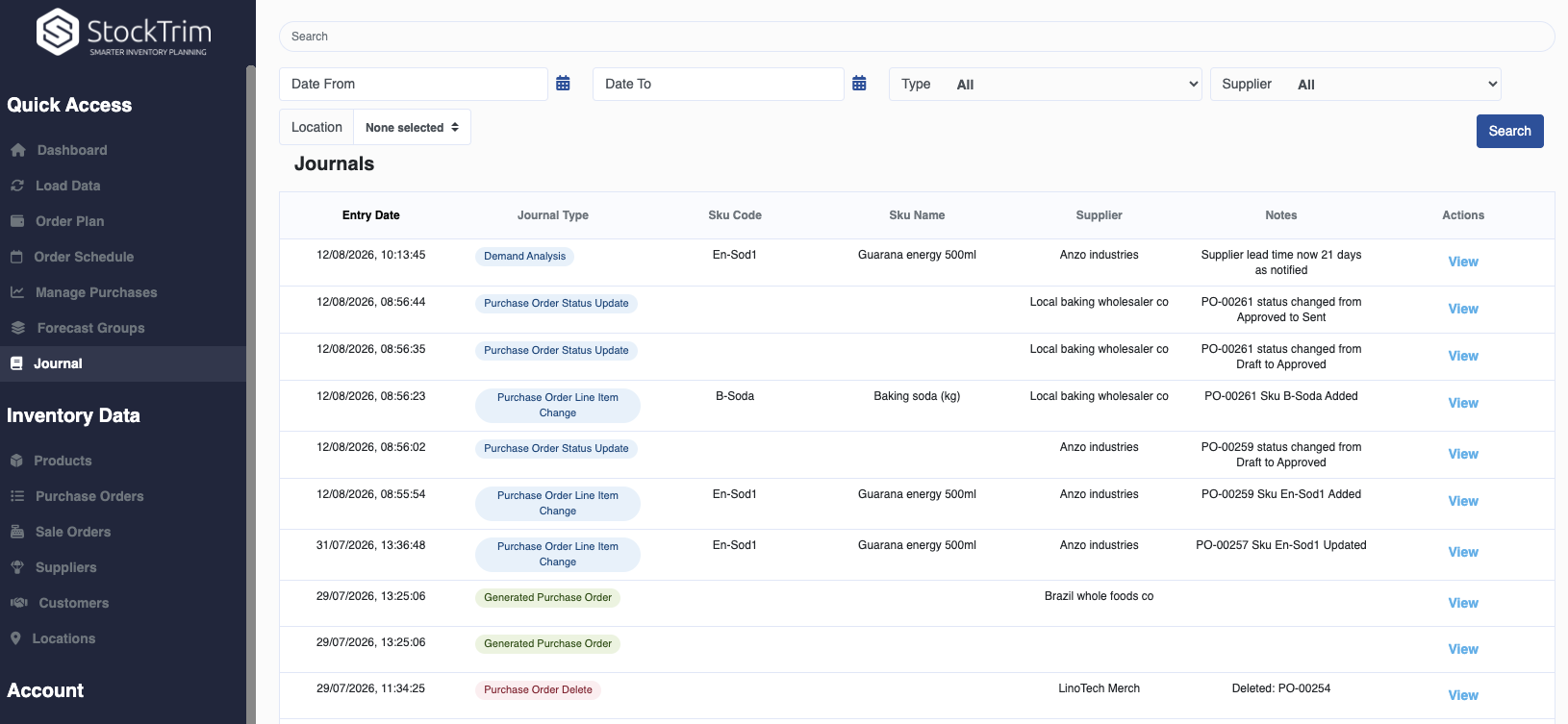
Access the Journal from the left-hand navigation to see a complete history of important inventory changes and decisions. Quickly find what you need using filters for date range, supplier, SKU and activity type.
See Exactly What Changed
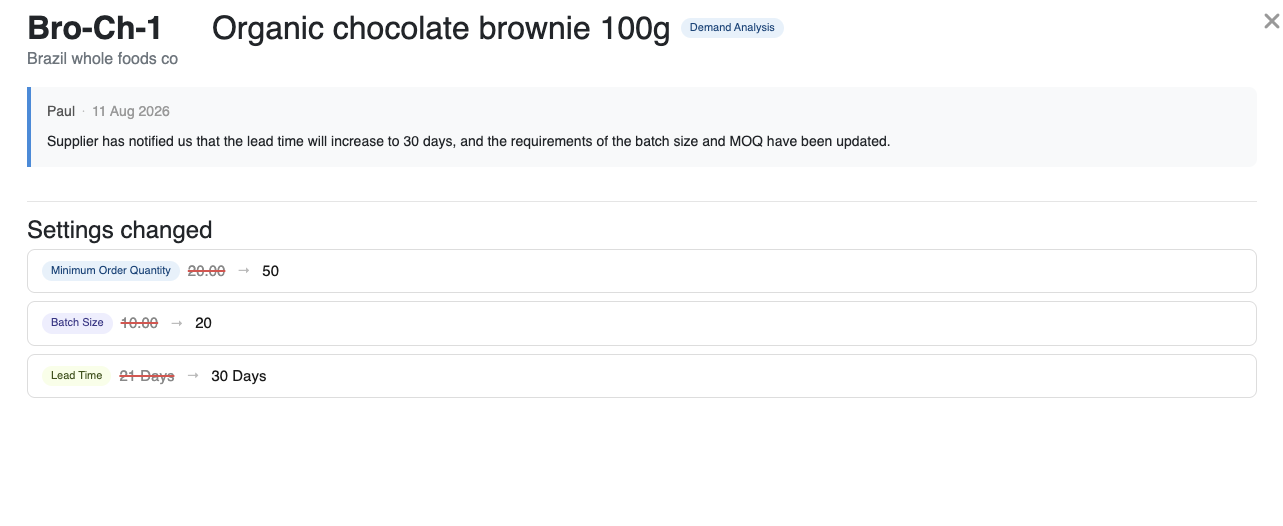 Open any journal entry to see the full details behind the change, including which fields were changed, their previous and new values, any notes recorded, who made the change, the type of activity, and when it occurred.
Add Context to Demand Changes
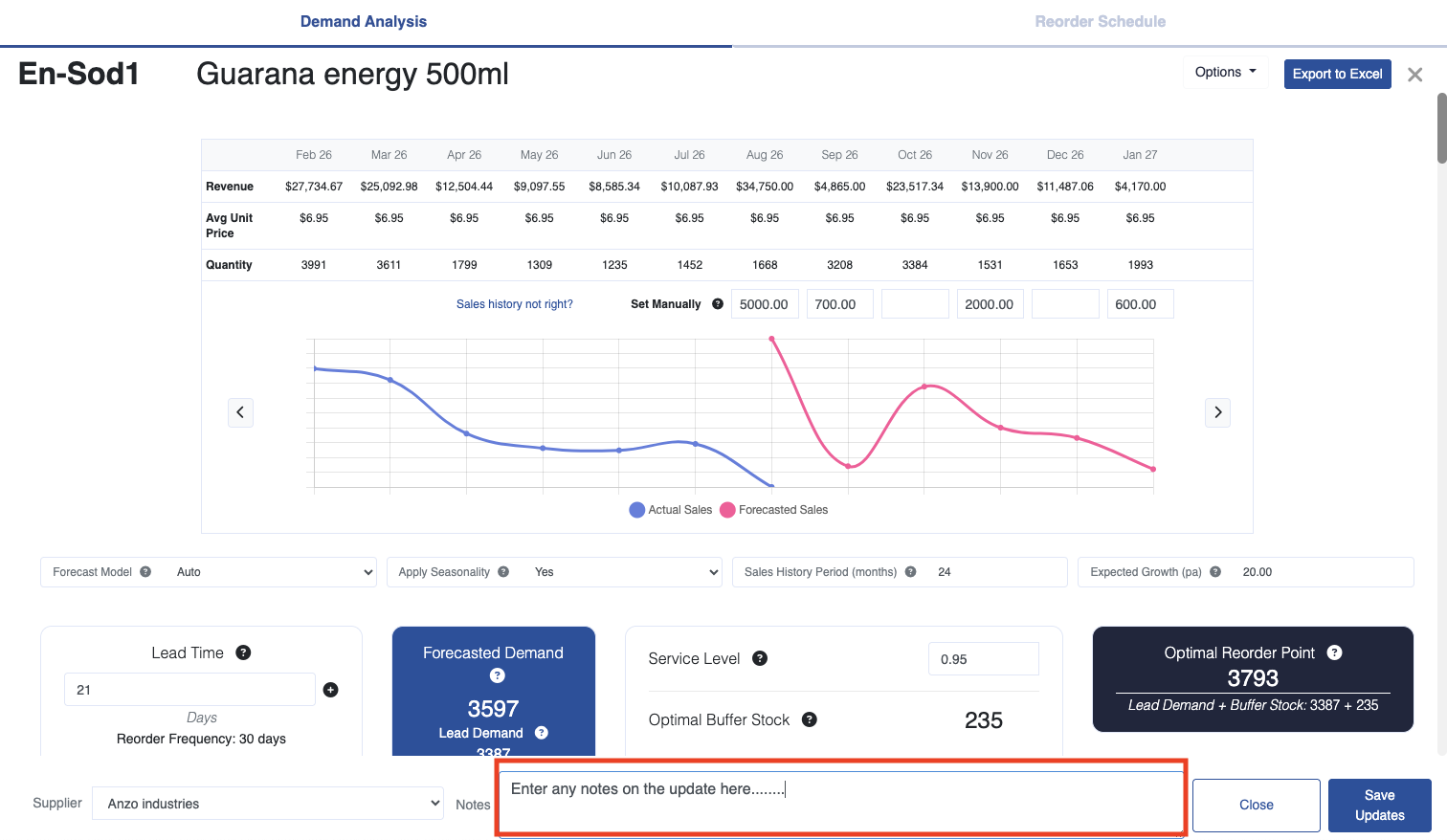
When making changes in Demand Analysis, you can now add notes explaining the reasoning behind your adjustments and select the relevant supplier. StockTrim records your notes alongside the changes made, giving you valuable context to refer back to later.
Keep a History of Purchase Order Decisions
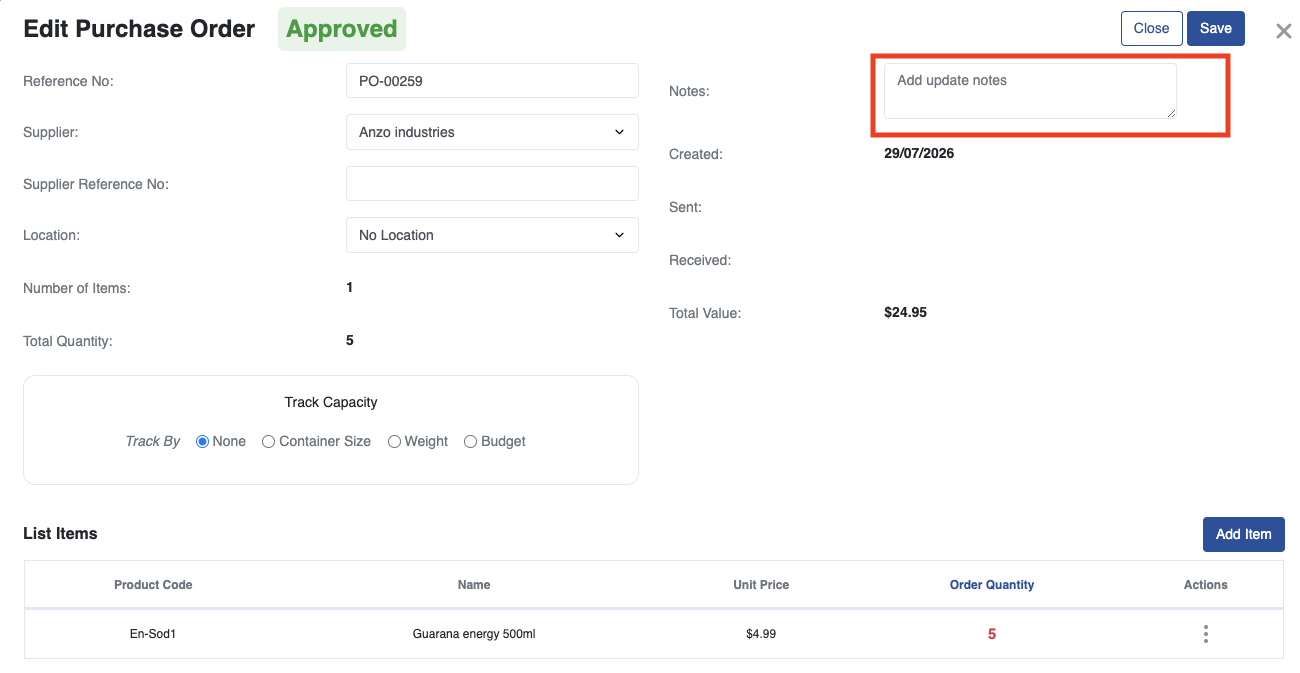
Add notes when editing a Purchase Order to record the reasoning behind your purchasing decisions. Your notes and the changes made to the order are automatically added to the Inventory Journal for future reference.
Track Changes to Suppliers
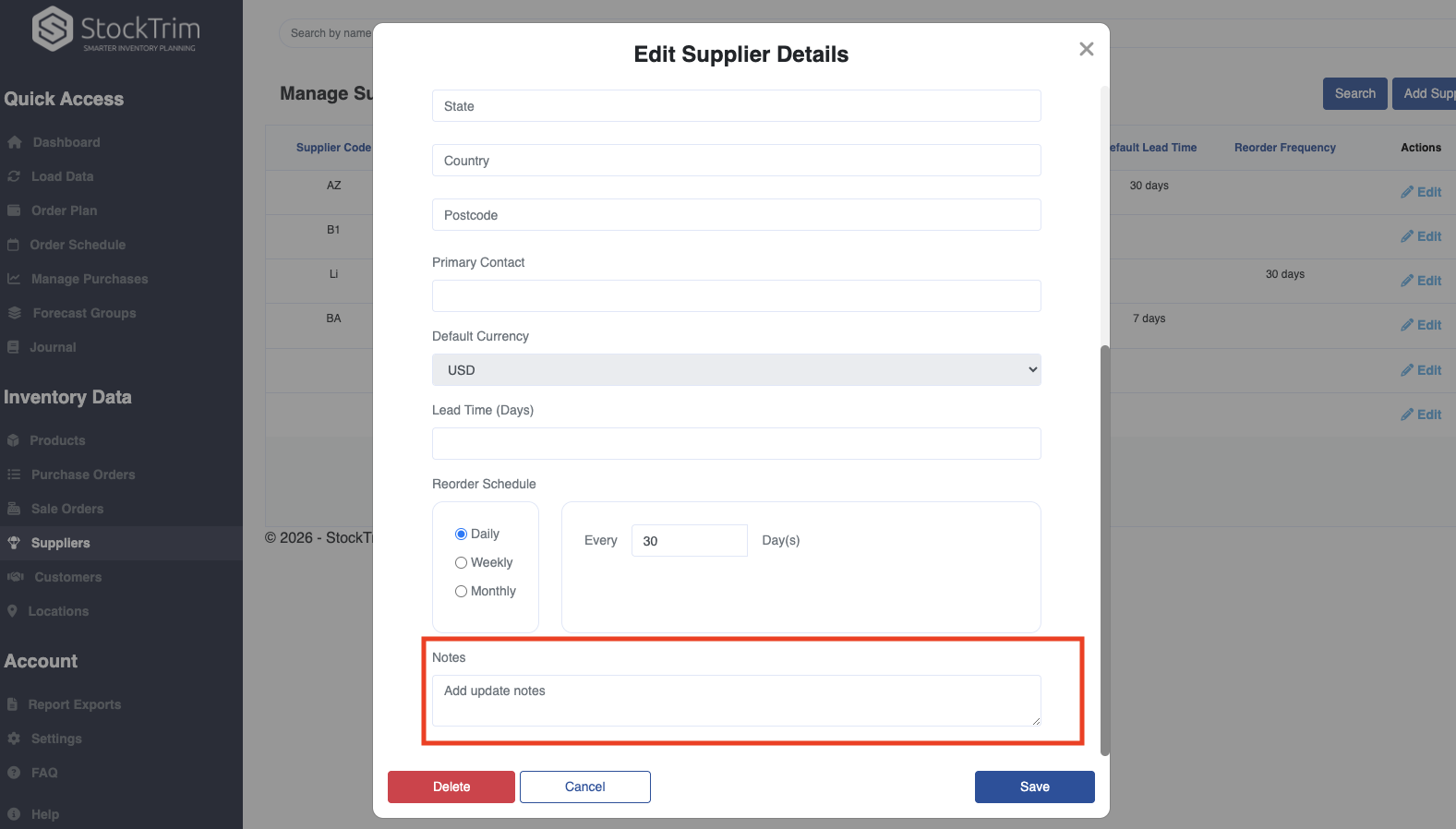
Changes to supplier details are now recorded in the Inventory Journal too. Add an optional note when making an update, creating a clear history of what changed, when it changed, and why.
Custom Demand - Bill of Materials Filter Down
Turn Demand Adjustments into Smarter Component Planning
We’ve just released a powerful new StockTrim feature for manufacturers: Bill of Materials Filter Down.
StockTrim already allows you to add custom demand to a forecast when you know future demand will be different, for example because of an upcoming promotion, a large customer order, a new contract, or another planned change in demand.
Now, when you adjust the demand for a manufactured product, StockTrim can automatically filter that change down through its Bill of Materials, updating the demand for every component or ingredient required to make it.
How it works
Imagine StockTrim forecasts demand for 1,000 units of a finished product.
You have an upcoming order or promotion and know you’ll need an additional 500 units, so you add that custom demand to the forecast.
If each finished product requires:
• 2 × Component A
• 1 × Component B
• 0.5 kg × Ingredient C
StockTrim automatically calculates the additional component demand required to manufacture those extra 500 units.
That updated demand then flows through to your inventory planning, helping ensure you order enough of the components and ingredients needed to meet your adjusted production requirements.
Shared components are handled intelligently
This gets particularly powerful when the same component is used across multiple manufactured products.
For example, Component A might be used in five different finished products.
If you increase the demand for just one of those products, StockTrim adjusts only the portion of Component A's demand that comes from that product.
The demand generated by the other four products remains unchanged.
So even with complex Bills of Materials and components shared across multiple products, StockTrim can accurately calculate how a change to one finished product should affect your overall component requirements without distorting the demand elsewhere in your manufacturing operation.
Add custom demand once and let it flow through your BOM
There are plenty of reasons you might want to adjust a forecast:
• An upcoming customer order
• A promotion or marketing campaign
• A new contract
• A planned production run
• A product launch
• Any other known increase or decrease in future demand
Instead of updating the finished product and then manually working out what that means for every ingredient or component, you can make the adjustment once.
StockTrim takes care of the downstream calculations.
Connect finished-product planning with component purchasing
Bill of Materials Filter Down creates a direct link between:
Forecast demand + custom demand → production requirements → component demand → purchasing requirements
For manufacturers, this means your component planning can stay aligned with changes you make to your finished-product forecasts.
If you decide you need to manufacture more or less of something, StockTrim helps make sure your purchasing plan reflects what you'll actually need to build it.
It’s a simple change that makes demand planning considerably more powerful for manufacturers, particularly those managing complex Bills of Materials and components shared across multiple products.
-1.png?width=1646&height=618&name=image%20(4)-1.png)
-2.png?width=1607&height=668&name=image%20(3)-2.png)
-Aug-13-2026-01-16-17-8898-AM.png?width=1616&height=590&name=image%20(1)-Aug-13-2026-01-16-17-8898-AM.png)
-Aug-13-2026-01-16-17-8770-AM.png?width=685&height=587&name=image%20(2)-Aug-13-2026-01-16-17-8770-AM.png)