


When you sell products in bundles, inventory planning gets complicated fast.
A gift set might fly off the shelves this month. At the same time, the items inside it are still selling on their own. Every bundle sale quietly eats into the stock you need for single sales, and the other way around. Without a system that sees both, you end up with stockouts on some items, too much of others, and cash tied up in the wrong places.
StockTrim's Bill of Materials (BOM) function fixes that. You link each bundle to the items inside it, and StockTrim forecasts demand for the bundle and for every component, so you always know what to order.

Why bundles break simple forecasts
Most inventory tools, and most spreadsheets, treat each SKU as its own island. The bundle has its own sales history. Each component has its own. Nothing connects them.
That causes three problems:
- Hidden demand. A component looks like a slow seller because its forecast only counts single sales, not the units going out inside bundles.
- Double counting. Stock gets counted at both the bundle and the component level, so you think you have more than you do.
- Guesswork purchasing. You pad orders "just in case," which is how overstock and wasted cash creep in.
If you've ever run out of a component while your bundle report said everything was fine, this is usually why. (We cover more causes in 8 proven ways to reduce stock-outs.)
What a bill of materials does for bundles
A bill of materials is a list of the parts, and the quantity of each, that make up a product. Manufacturers use them to plan production, but they work just as well for kits, combo deals, gift boxes and multipacks.
Say you sell a "Starter Kit" that contains:
- 1 x Shampoo 500ml
- 1 x Conditioner 500ml
- 2 x Travel bottles
Once StockTrim knows that recipe, it can see the real demand for every item, whichever way customers buy it.
How StockTrim forecasts bundles and their components
In StockTrim, you set up the relationship between each bundle (the parent SKU) and its components. From there, StockTrim does the math:
- It forecasts demand and buffer stock for the bundle, based on its sales history.
- It works out how many of each component you'll need to build those bundles, using the quantities in your BOM.
- It combines that with demand for the components that sell on their own, so you get one clear number per SKU.
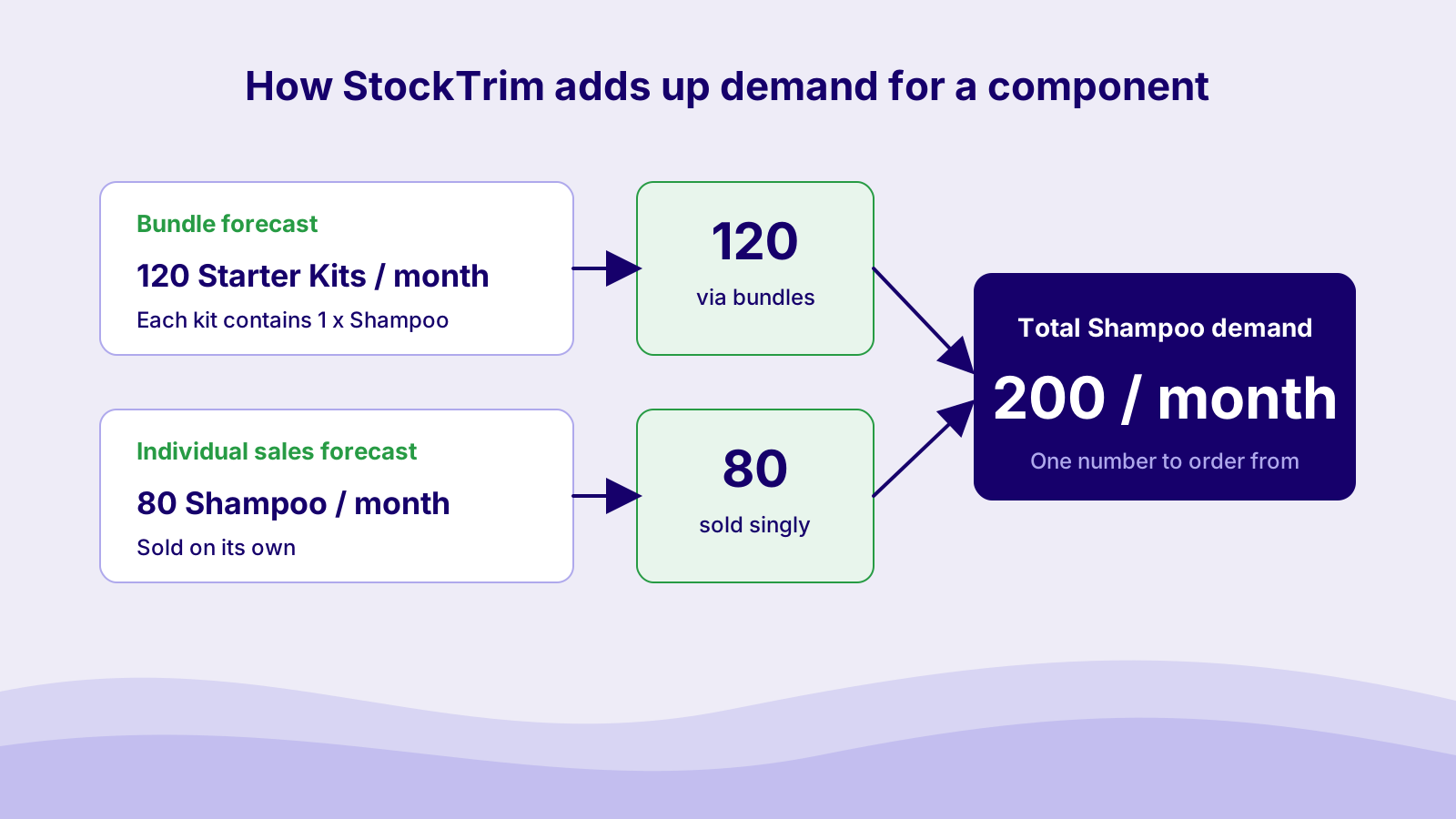
StockTrim also avoids counting the same stock twice. A setting lets you choose whether finished bundle stock is included in component stock levels, so the numbers match how you actually build and store your bundles.
Want to see it in action? Watch the short overview on our manufacturing features page, or read the help article on how component order quantities are calculated.
What this means for your business
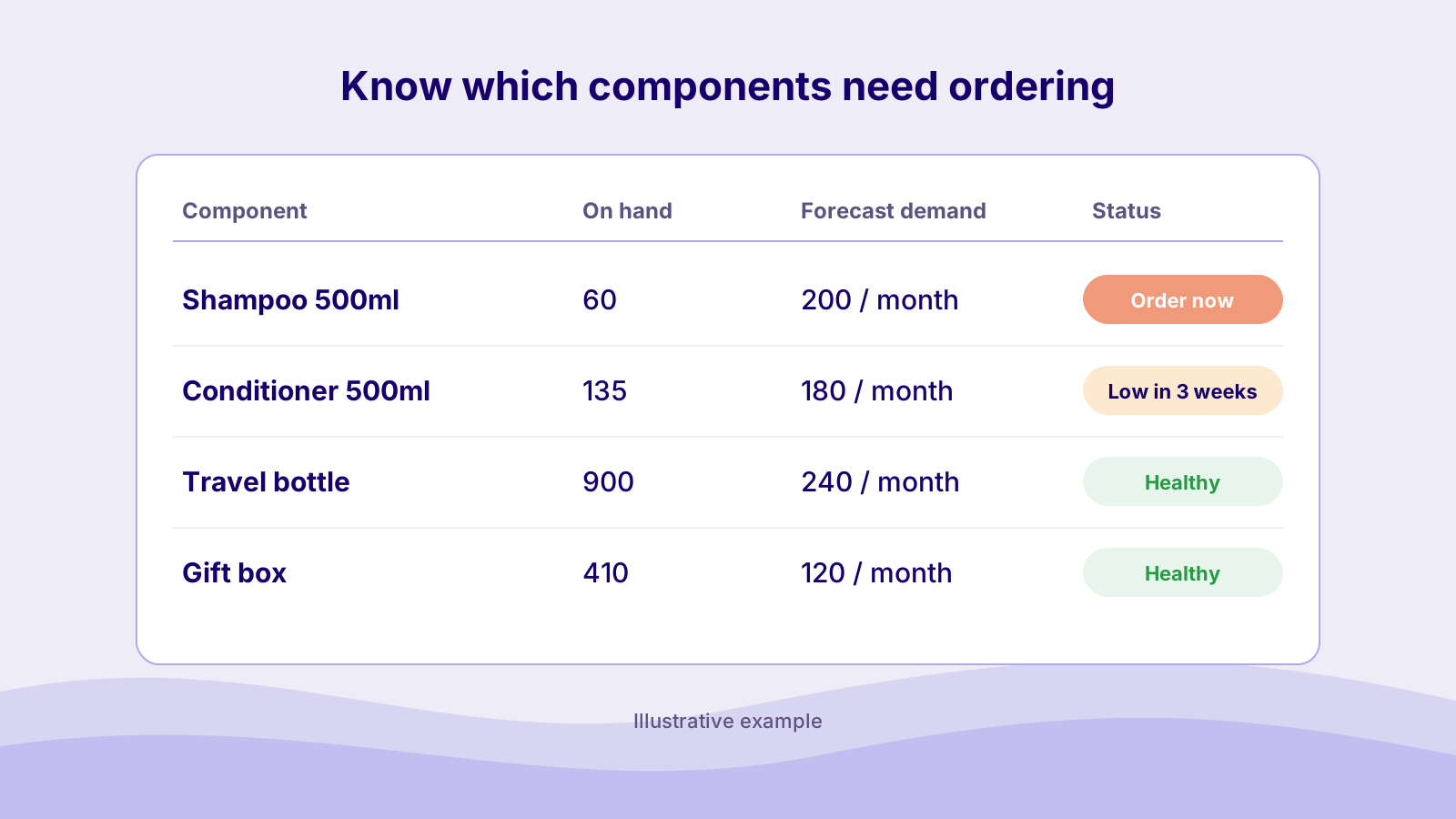
- Smarter purchasing. Order exactly what you need across bundles and single sales. No more adding the two together by hand. (If you're unsure where to start, here's our guide on how much inventory to order.)
- No surprises. See when a component is running low before it stops you building or shipping a bundle.
- Less waste. Keep stock levels balanced without over-ordering, so cash isn't sitting on your shelves. Read more on reducing excess inventory while avoiding stockouts.
Who gets the most out of bundle forecasting
- Ecommerce brands selling gift sets, kits and multipacks. If you're on Shopify, product bundling is a popular way to lift order value, and our Shopify inventory management guide covers the stock side.
- Wholesalers and distributors putting together combo deals, starter packs or display packs.
- Manufacturers assembling finished goods from parts. If your products have sub-assemblies inside assemblies, the Raw Materials Forecasting & Multi-Level BOMs add-on handles that. See how it works in Component Demand Planning: Smarter BOM Purchasing.
Frequently asked questions
What is a bill of materials for a bundle?
It's the list of items inside a bundle and ho43w many of each. For example, a Starter Kit might contain one shampoo, one conditioner and two travel bottles. StockTrim uses that list to turn bundle demand into component demand.
Can StockTrim forecast items that sell both on their own and inside bundles?
Yes. StockTrim works out how many of each component your bundles will need, then combines that with the component's own sales forecast. You see one total demand figure for each SKU.
Will my stock be counted twice?
No. StockTrim has a setting that controls whether finished bundle stock is included in component stock levels, so you can match it to how you build and store your bundles.
What if my products have multiple BOM levels?
If a component is itself made from other parts, you'll want the Raw Materials Forecasting & Multi-Level BOMs add-on. It carries demand down through every level, from finished product to raw material.
How quickly can I get started?
StockTrim connects to the inventory systems you already use, and most customers are up and running within a few hours. You can check our integrations or start a 14-day free trial with no credit card needed.
Stop juggling bundle spreadsheets
Whether customers buy a kit, a combo deal or a single item, StockTrim gives you clear visibility across every product. Fewer stockouts, less overstock, and happier customers.
Start your free 14-day trial or book a demo to see bundle forecasting with your own data.